Real-Time B2B Visitor Identification Platforms for Sales Teams
These tools turn anonymous website visitors into sales-ready leads in real time.
- Written by
- Tomás Vreeland
- Published
- October 13, 2026
- Reading time
- 10 min read
What this covers
Most people who visit a B2B website leave without filling out a form, and that single fact turns the website into both the most important stop in the buying journey and the biggest blind spot a sales team has. Buyers now do most of their research on their own, often reaching a late stage of evaluation before a vendor ever hears from them, so the real window for engagement opens on the site itself, long before anyone reaches an inbox. Standard web analytics can tell a marketer that someone looked at the pricing page, but it cannot say who looked, and that missing name is the whole reason this category of software exists. By the time a visitor finally submits a form, there's a real chance a competitor spotted them earlier and already opened a conversation. The stakes here are about timing as much as data: whoever notices the buyer first gets the first conversation.
What real-time B2B visitor identification platforms do
Visitor identification platforms take a step past analytics. They combine IP resolution, identity graphs, and behavioral data to attach a company name, and sometimes a specific person's identity, to a session that would otherwise stay anonymous, then hand that information to sales while the visit is still happening. What makes this different from a CRM or an analytics dashboard is that none of it depends on the buyer doing anything. No form, no chat message, no clicked email. The data shows up because someone visited, full stop.
The most important divide in the category: company-level versus person-level identification
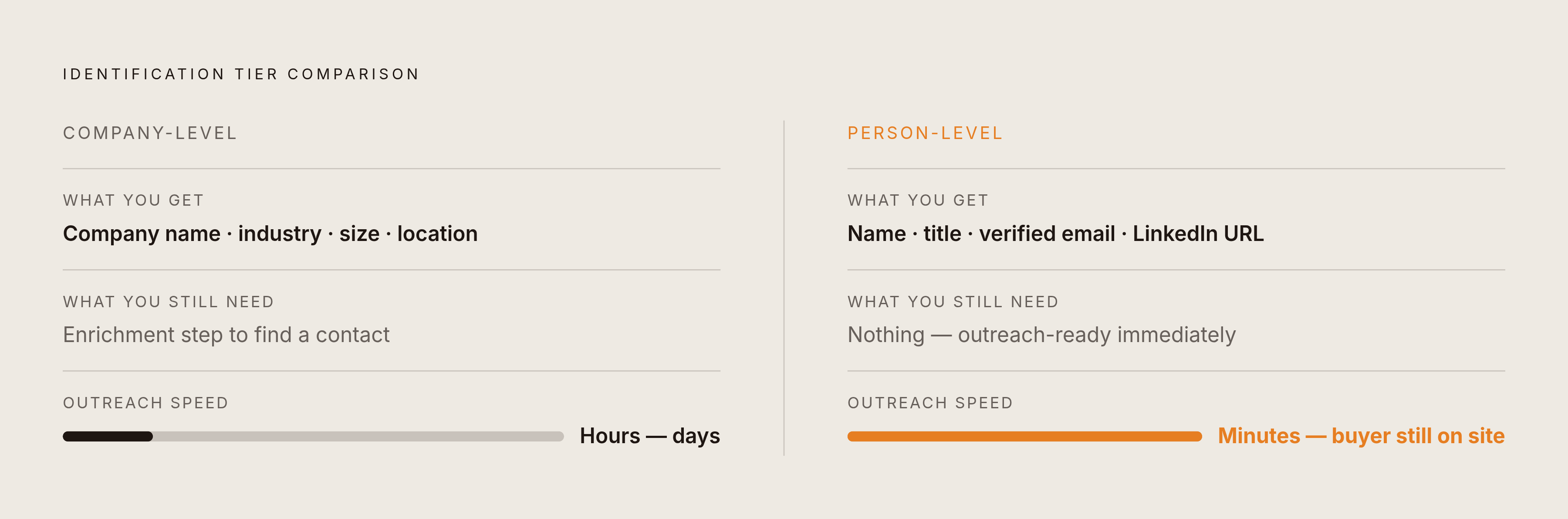
Not every identification platform delivers the same thing, and the gap between knowing which company is on your site and knowing which person at that company is the single biggest factor in whether a sales rep can act. Company-level identification matches an IP address to a corporate network and returns a company name along with firmographic details. Company-level data tells a rep "a company that fits our ICP is on the site" without telling them who to call. Someone still has to run a separate enrichment step before outreach can happen. Person-level identification goes further, resolving an individual visitor down to a name, job title, verified email, and LinkedIn URL, usually by checking browser signals against identity graphs built from known professional profiles. That lets a rep reach a named buyer within minutes, while the buyer is still active on the site. A team buying a company-level tool while expecting person-level results will come away disappointed, so the real evaluation question is whether the sales motion in question needs a name or just an account.
Match rates: vendor claims versus what teams see
Vendor-quoted match rates blur the line between company-level and person-level identification constantly, and a sales team that doesn't know to ask which one it's looking at will end up buying based on a number that has nothing to do with the data it eventually receives. A high headline match rate is almost always a company-level figure. Person-level identification runs meaningfully lower and is far harder to scale, so a vendor who quotes one number without specifying which kind of match it describes is giving a number built to impress. Before signing anything, a buyer should ask a plain question: is this match rate measured at the company level or the person level, and how exactly do you define a match? A vendor that can't answer clearly is handing over a number that shouldn't be trusted. ZoomInfo's own evaluation framework points to the right criteria here: match rate methodology, how the tool handles remote and VPN traffic, and whether the pricing holds up predictably as usage grows.
Privacy compliance and the geographic ceiling on person-level identification
Law sets a hard ceiling on what's possible, and it's geographic: person-level identification that works without issue on US traffic is largely off-limits for EU visitors unless the platform has explicit consent, so a team's pipeline geography should shape which type of tool it buys. Under GDPR, identifying an individual from their behavior on a website counts as processing personal data, and that generally requires a lawful basis under Article 6, such as affirmative consent or, in narrower cases, legitimate interest. In practice, most cookie-based or individual-level tracking also needs consent under the ePrivacy Directive, so the absence of that consent makes person-level identification on EU traffic a legal wall. Company-level identification sits in a different legal category. Data about a legal entity, rather than an identifiable person, generally falls outside GDPR's definition of personal data. Company-level tools can rely on legitimate interest as a legal basis, provided they document a real balancing test, and they keep operating across Europe without the same friction. When a person-level vendor calls itself "GDPR compliant," that usually means it has simply chosen not to attempt person-level identification on EU traffic at all, which is a compliant position but not a functional one for a European pipeline. The practical upshot: a sales team whose pipeline runs mostly through the UK or the EU should judge company-level tools on their own merits instead of assuming person-level identification is automatically the better buy.
Converting visitor signals into outreach
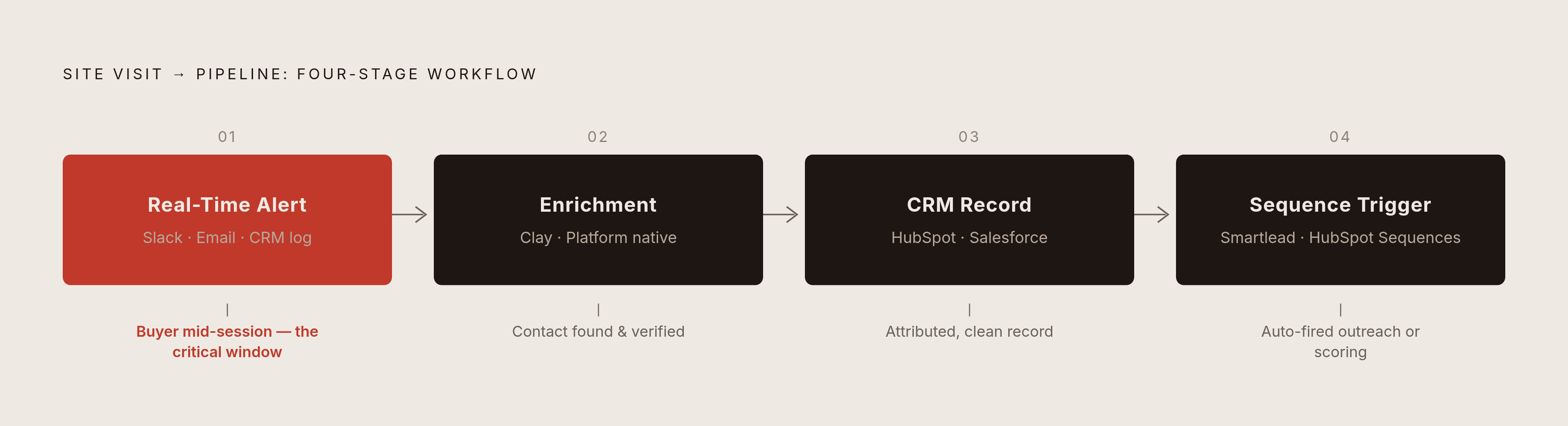
Visitor identification only pays off if there's a workflow built around it. The teams that actually get pipeline out of this treat identification as a trigger that sets off enrichment, CRM updates, and outreach automatically. The chain that shows up in strong implementations starts with a real-time alert, in Slack, by email, or logged directly as CRM activity, the moment a high-value account or a named target lands on a key page. That alert then feeds an enrichment step, either built into the platform itself or handled through a tool like Clay, which finds the right contact at the company, verifies their email, and pulls recent context about the business. From there, the enriched lead lands in the CRM, whether that's HubSpot or Salesforce, as a properly attributed record that automatically triggers the right sequence or scoring rule. This identification-to-Clay-to-CRM pattern has become a common setup for teams that want to go from a raw company signal to a sequenced, personal outreach campaign without anyone doing manual research on each lead, usually paired with a dedicated sending tool such as Smartlead or HubSpot's own sequences. Catching a buyer while they're still actively researching is a different conversation than reaching them three days later, which makes platform latency, how fast the data becomes usable, an evaluation point that gets less attention than it deserves. Data should move both directions automatically, without someone exporting a CSV by hand. Every platform should be held to the standard of bi-directional, automatic sync.
AI agent and crawler detection: the emerging signal-quality problem platforms haven't fully solved
AI crawler traffic lives in server logs, not in the dashboards most teams check, because standard analytics tools filter out known bots automatically, which makes that traffic invisible to anyone evaluating site performance or buyer intent. The signals that used to separate a bot from a human, oddly perfect timing, predictable mouse movement, a missing browser fingerprint, now appear in sophisticated crawlers too, so simple bot filters miss more than they used to catch. The sharper edge of bot detection has moved toward reading intent: looking at the pattern of requests, which pages, in what order, at what pace. For a visitor identification platform, a crawler that slips through creates a false positive. A "company" that appears to be browsing pricing content might be an AI agent rather than a human buyer, and a sales rep who acts on that signal burns time on a lead that was never there. The better platforms treat this as a first-order problem rather than an afterthought: they detect and report AI agents, including ChatGPT and Claude, showing what content they consumed and who operates them, so a sales team can separate genuine human buyer activity from automated traffic with confidence. That distinction matters more by the month, since AI systems increasingly research products and vendors on behalf of a human operator, and that operator, sitting behind the agent, is itself a prospect worth identifying in its own right.
Paid media attribution: connecting ad spend to the companies it reached
Visitor identification becomes a lot more useful once it can tie ad spend to the specific companies and people that spend actually reached. Without that link, a marketing team is optimizing campaigns without being able to see what worked, and a sales team can't tell which touches happened before a deal ever started moving. A company sees a LinkedIn ad, visits the pricing page because of it, and then fills out a form weeks later, but the CRM logs the form fill as the first touch, and the ad's role in warming up that account disappears entirely, along with the budget case for the spend that produced it. Closing that loop means connecting four things: ad platform data on impressions, clicks, and spend; visitor identification showing which company or person those ads actually reached on the site; the CRM pipeline; and the revenue that eventually closes. Integrating directly with major ad platforms as well as HubSpot and Salesforce lets a team attribute paid-media spend to the specific companies and individuals it influenced, crediting more than just the eventual form fill. That matters in very concrete budget terms: when a sales rep can point to a target account that visited the site three separate times after seeing a LinkedIn campaign, the demand-gen team has actual evidence to defend that line item.
Platforms worth evaluating
The right platform depends on whether a team needs a name or just an account, where its pipeline sits geographically, and how tightly the tool has to plug into the systems sales already runs, so no single platform wins for every buyer. It fits sales, demand-gen, and agency teams looking for one intelligence layer that covers identification, signal quality, and attribution together. It suits large B2B sales teams running account-based motions who already have a ZoomInfo contract and want visitor data layered on top. HubSpot Breeze Intelligence lives natively inside HubSpot's CRM, surfacing anonymous company visitors and enriching company records with firmographic data, with rep alerts built directly into the CRM activity feed and no outside API needed. It's the natural fit for teams that run their entire go-to-market motion inside HubSpot and want identification without bringing on another vendor. Snitcher offers native CRM sync across six platforms, including HubSpot, Salesforce, Pipedrive, Zoho, Microsoft Dynamics, and Attio, with real-time alerts through Slack, Teams, and email when high-value prospects are browsing, built on company-level identification, which makes it a strong option for teams that want broad CRM compatibility and real-time alerts without the price tag of a larger platform.
What to demand before signing a contract
A polished demo does not predict whether a visitor identification tool will produce pipeline, yet most buyers decide on the demo anyway and regret it later. Start by demanding a straight answer on identification depth: ask whether match rates are company-level, person-level, or some blend of the two, and ask for the breakdown. Push for a pilot on your own traffic, running two to four weeks before any commitment, since a vendor confident in its numbers will agree to this without hesitation. Ask directly how the platform handles remote workers, VPN users, and residential internet connections, because these are the segments most likely to go unidentified, and a vendor who glosses over them is quietly inflating its headline numbers. If the pipeline includes UK or EU accounts, get a clear answer on what the tool actually returns for that traffic and what legal basis it relies on to do so. Learning that "are you GDPR compliant" means "we don't attempt to identify EU visitors" is a fact worth knowing before signing. On integration, insist on bi-directional, automatic sync as the baseline, and ask specifically whether data moves both ways without manual exports and whether the connection is native or routed through something like Zapier. Ask how quickly a visitor event turns into an actionable alert: the gap between a few minutes and a few hours can mean reaching a buyer mid-session versus reaching them after they've already moved on. Ask what the platform does to separate human visitors from crawlers and AI agents, because a vendor that can't answer this clearly is handing over noisier data than its match-rate claims suggest. If paid media spend is a meaningful part of the budget, ask whether the platform connects ad impressions and clicks to identified visits and eventually to closed revenue, or whether that attribution work requires a separate tool. Finally, get clarity on how pricing scales, whether it's tied to identified visitors, total traffic, or seats, and run the math on what the bill looks like at twice current traffic before anyone signs anything.